
This feature allows users with Creator access, to export your raw data directly from the Platform. To access it, go to the Results page, make sure you are in the Detailed Results section and navigate to the right to find our 'Export' options:
- Raw data in Excel: export an xlsx file of all of your raw survey data, and receive the file via email.
- Results in Excel: Export the data to an Excel-compatible format. If any cross and/or filter variables are applied, you will export the filtered data.
- Print: Export your results in a print ready format, or save as PDF.
If you want to export your raw survey data file but don't have Creator access, please email your assigned project manager or ask a team member with Creator access to export it for you.
Advantages:
- No need to ask your project manager for raw data
- You can export your data as many times as you wish
- Start analyzing your data immediately to build recommendations
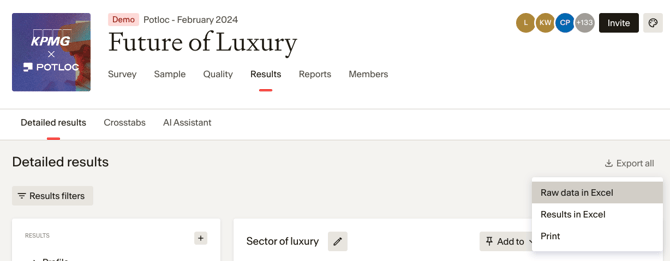
Available export formats
The Platform automatically generates exports exclusively in Excel with text format. However, upon request, our team can also manually prepare an SPSS or alphanumerical Excel file.